Starting to track your period is easy. Still logging in month three is the hard part. Most people don't stop because they lose interest; they stop because they forget. On the day your period starts you're busy with other things, and by evening it has slipped your mind. This guide covers how to keep tracking small, and how Virora's reminders and widget make that easier.
Habits start small
In a study that followed people building a new daily habit of their choice — something to eat, drink or do for exercise — it took a median of 66 days for the behaviour to become automatic, ranging from 18 to 254 days. The same study found that missing a single day didn't meaningfully set the process back. Lally et al., 2010 Two practical points follow:
- Keep each entry small. You don't need to write a long journal every day. Picking your mood with one tap counts as an entry.
- Don't worry about a missed day. If you skipped an evening, pick up where you left off the next day. Don't fill in days you don't remember with guesses; a made-up entry misleads more than an honest gap.
It also helps to tie your entry to something you already do: after brushing your teeth, while the kettle boils, or when you plug in your phone before bed. Timing your reminder to that moment keeps it from becoming noise.
Virora has two kinds of reminders
You'll find them through the profile icon at the top right of Home: Settings → Tracking preferences → Notifications. One notification permission on your phone is enough; you choose which reminders are on separately here.
Period reminders
This reminder is on by default and lets you know in three situations:
- When your period is coming up. You get two notifications before the predicted start, by default 4 and 2 days before. You can change both to anything from 1 to 30 days under Reminder timing, where you'll also see your next predicted period date.
- When your period is late. If there's still no new entry 2 and 5 days after the predicted start, you get a reminder to check. More often than not, this catches a period you forgot to log rather than a real delay.
- When the end date is missing. If your period is logged as started but no end has been added after the expected length, you're asked once. If it's still going, tap Still ongoing in the notification and the app stays closed. If it has ended, Add end date takes you straight to the calendar.
End dates matter: the length of the dashed days in your predictions comes from the end dates you log. We explain how predictions are built in how to read the predictions in your period calendar.
Daily journal reminder
This reminder is off by default. When you turn it on, it asks each evening at the time you choose (20:00 to start with) whether you'd like to add today's note. It follows your account's time zone and you can change it from the Reminder time row.
The most useful part: if you've already added an entry that day, the reminder doesn't come. As long as you log regularly, it stays out of your way and only steps in on the days you forget. If you're not sure what to write, try our mood and symptom journal template.
Shortcuts that make logging quicker
A reminder brings you to the app; the less time you spend there, the easier the habit sticks. Home has two shortcuts:
- The How are you today? card saves your mood with one tap. Tap Add details if you'd like to note symptoms or more.
- The Started and Ended buttons log your period for today. If you tapped by mistake, Undo takes it back.
Home screen widget: check without opening the app
Reminders arrive at set moments; the widget is in front of you every day. The Virora widget shows how many days are left until your next period, which day of your cycle you're on and which phase you're in.
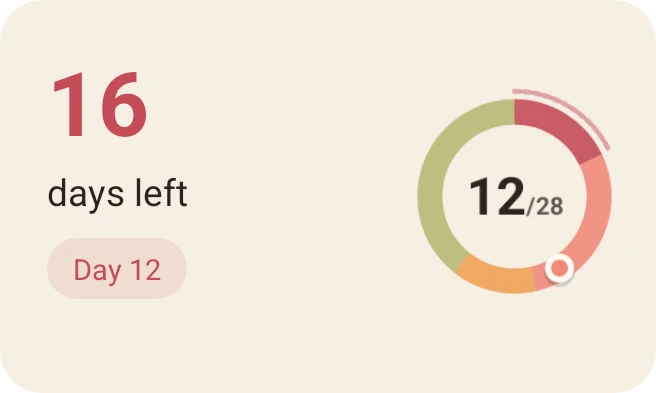
The Virora widget with sample data.
The widget changes with your cycle: during your period it shows the period day and the estimated days left, on the predicted start day it says "Today", and if your period is late it shows how many days late. Tapping the widget opens the app.
Seeing a due prediction every day also makes it harder to forget an entry. If the widget says "days late" but your period has actually started, that's your cue to log it.
On Android: go to Settings → Tracking preferences, tap Add widget to home screen on the Home screen widget card and confirm in the window your phone opens. You can resize the widget on your home screen.
On iPhone: touch and hold an empty area on your Home Screen, then choose Edit → Add Widget and select Virora. It comes in small and medium sizes; the small one shows only the days left and the cycle ring.
A quick setup checklist
- Allow notifications and choose how early your period reminders arrive.
- Turn on the daily journal reminder and set it to an evening routine you already have.
- Add the widget to your home screen.
- Tap the buttons on Home when your period starts and ends.
- If you miss a day, carry on the next one.
If you're wondering where your notifications and entries are stored, read our guide to period tracker privacy.
Virora is a tracking and journaling app. Its reminders and widget are based on calendar calculations and don't assess your health. If your period is late several times in a row, your cycle has clearly changed, or you might be pregnant, talk to a health professional.